




Index is a state-of-the-art open-source browser agent that autonomously executes complex web tasks. It turns any website into an accessible API and can be seamlessly integrated with just a few lines of code.
- Powered by reasoning LLMs with vision capabilities.
- Gemini 2.5 Pro (really fast and accurate)
- Claude 3.7 Sonnet with extended thinking (reliable and accurate)
- OpenAI o4-mini (depending on the reasoning effort, provides good balance between speed, cost and accuracy)
- Gemini 2.5 Flash (really fast, cheap, and good for less complex tasks)
-
pip install lmnr-indexand use it in your project -
index runto run the agent in the interactive CLI - Supports structured output via Pydantic schemas for reliable data extraction.
- Index is also available as a serverless API.
- You can also try out Index via Chat UI.
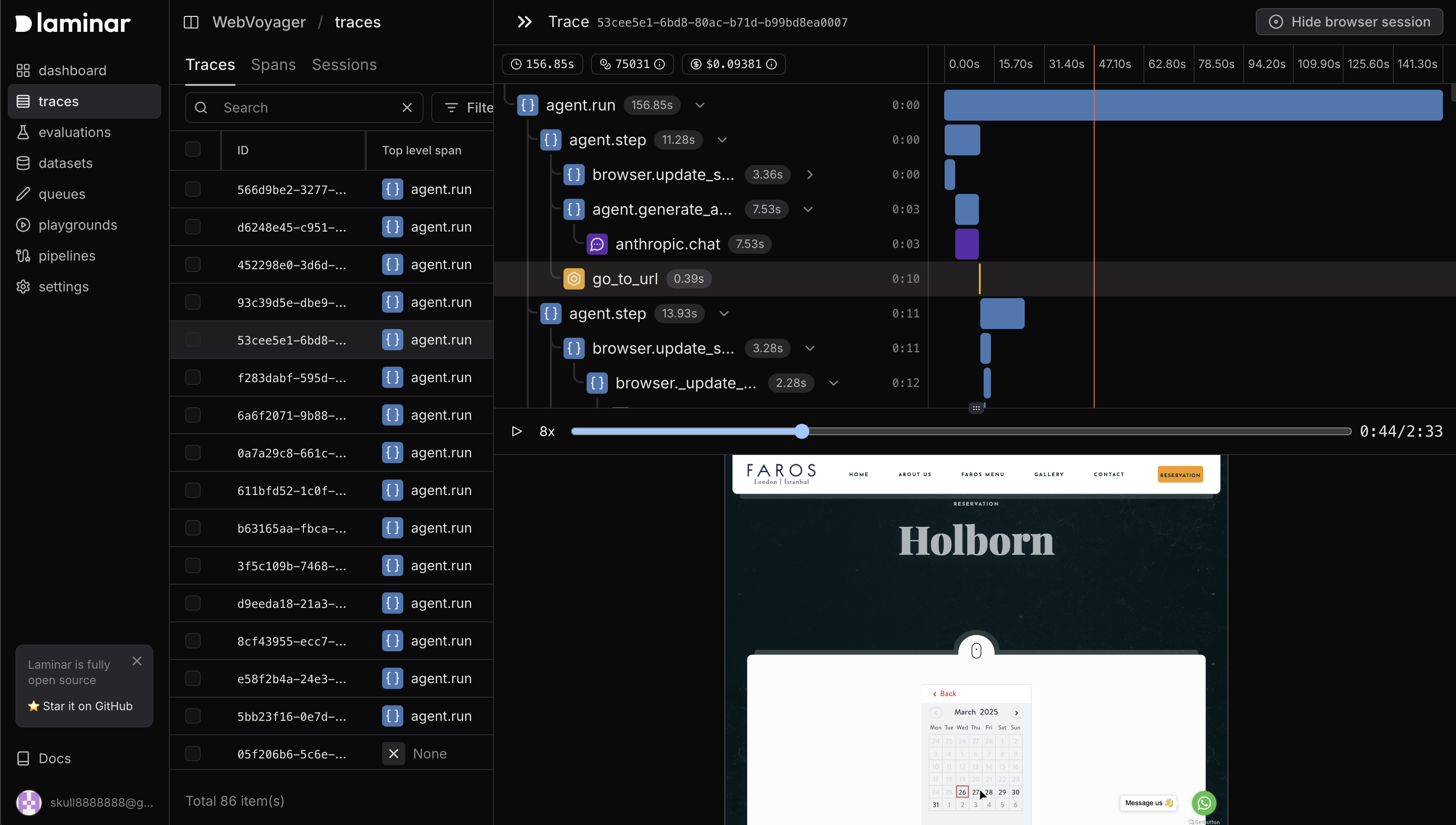
- Supports advanced browser agent observability powered by open-source platform Laminar.
prompt: go to ycombinator.com. summarize first 3 companies in the W25 batch and make new spreadsheet in google sheets.
local_agent_spreadsheet_demo.mp4
Check out full documentation here
pip install lmnr-index 'lmnr[all]'

# Install playwright
playwright install chromium
Setup your model API keys in .env file in your project root:
GEMINI_API_KEY=
ANTHROPIC_API_KEY=
OPENAI_API_KEY=
# Optional, to trace the agent's actions and record browser session
LMNR_PROJECT_API_KEY=
import asyncio
from index import Agent, GeminiProvider
from pydantic import BaseModel
from lmnr import Laminar
import os

# to trace the agent's actions and record browser session
Laminar.initialize()

# Define Pydantic schema for structured output
class NewsSummary(BaseModel):
    title: str
    summary: str

async def main():

    llm = GeminiProvider(model="gemini-2.5-pro-preview-05-06")
    agent = Agent(llm=llm)

    # Example of getting structured output
    output = await agent.run(
        prompt="Navigate to news.ycombinator.com, find a post about AI, extract its title and provide a concise summary.",
        output_model=NewsSummary
    )

    summary = NewsSummary.model_validate(output.result.content)
    print(f"Title: {summary.title}")
    print(f"Summary: {summary.summary}")

if __name__ == "__main__":
asyncio.run(main())Index CLI features:
- Browser state persistence between sessions
- Follow-up messages with support for "give human control" action
- Real-time streaming updates
- Beautiful terminal UI using Textual
You can run Index CLI with the following command.
index runOutput will look like this:
Loaded existing browser state
╭───────────────────── Interactive Mode ─────────────────────╮
│ Index Browser Agent Interactive Mode                       │
│ Type your message and press Enter. The agent will respond. │
│ Press Ctrl+C to exit.                                      │
╰────────────────────────────────────────────────────────────╯

Choose an LLM model:
1. Gemini 2.5 Flash
2. Claude 3.7 Sonnet
3. OpenAI o4-mini
Select model [1/2] (1): 3
Using OpenAI model: o4-mini
Loaded existing browser state

Your message: go to lmnr.ai, summarize pricing page

Agent is working...
Step 1: Opening lmnr.ai
Step 2: Opening Pricing page
Step 3: Scrolling for more pricing details
Step 4: Scrolling back up to view pricing tiers
Step 5: Provided concise summary of the three pricing tiers
You can use Index with personal Chrome browser instance instead of launching a new browser. Main advantage is that all your existing logged-in sessions will be available.
# Basic usage with default Chrome path
index run --local-chromeThe easiest way to use Index in production is with serverless API. Index API manages remote browser sessions, agent infrastructure and browser observability. To get started, create a project API key in Laminar.
pip install lmnrfrom lmnr import Laminar, LaminarClient
# you can also set LMNR_PROJECT_API_KEY environment variable
# Initialize tracing
Laminar.initialize(project_api_key="your_api_key")
# Initialize the client
client = LaminarClient(project_api_key="your_api_key")
for chunk in client.agent.run(
stream=True,
model_provider="gemini",
model="gemini-2.5-pro-preview-05-06",
prompt="Navigate to news.ycombinator.com, find a post about AI, and summarize it"
):
print(chunk)
Both code run and API run provide advanced browser observability. To trace Index agent's actions and record browser session you simply need to initialize Laminar tracing before running the agent.
from lmnr import Laminar

Laminar.initialize(project_api_key="your_api_key")
Then you will get full observability on the agent's actions synced with the browser session in the Laminar platform. Learn more about browser agent observability in the documentation.
Made with ❤️ by the Laminar team